Media tutorial

Subscribe For Free Updates!

We'll not spam mate! We promise.

Showing posts with label linux. Show all posts

2014-03-04

Create a local server in linux mint 16 (Lamp)


     Create a local server in linux mint 16 (petra), install Lamp (Linux Apache MySQL PHP).
In this  tutorial we will install apache, php5, MySQL and phpMyAdmin on Linux Mint 16.


Create a local server

Install apache 


Sudo apt-get install apache2 
 Verification:  in the browser :  http://localhost/  ( "it's work" if  installation completed successfully)

Install PHP5


sudo apt-get install php5 libapache2-mod-php5
Restart apache 


sudo /etc/init.d/apache2 restart


verification : create a php file to test and move it into.:
/ var / www / 
open :  localhost / test.php
Open the folder. / Var / www as root to copy or move the file in test.php.

Install MySQL

sudo apt-get install mysql-server

Create password


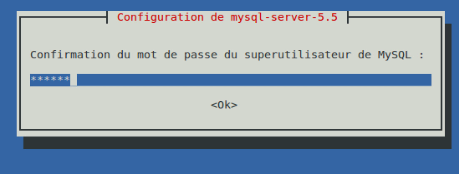
Confirm password


Install phpmyadmin

sudo apt-get install phpmyadmin

Select the web server to reconfigure automatically.
Choose automatic configuration
Password of the server administrator
Password MySQL connection
Confirmation du mot de passe mySQL
If you receive a 404 error when accessing: http://localhost/phpmyadmin: edit the file: apache2.conf
sudo gedit /etc/apache2/apache2.conf
add this line to the end of file : Include /etc/phpmyadmin/apache.conf restart appache :
 sudo /etc/init.d/apache2 restart
 http://localhost/phpmyadmin:
tutorial  video (french ) 

2014-03-02

Fedora live USB creator


Fedora Live USB Creator is a simple tool designed to create  bootable live USB Fedora to try live or install from  USB drive.


Download :
USB Creator : https://fedorahosted.org/liveusb-creator/
Fedora iso : http://www.fedora-fr.org/


We can download directly Fedora with Fedora live USB Creator Use :
1. select the iso Fedora2.
Targuet device : your USB 
3. Créate live USB  


When finish we can use usb as live fedora or to install Fédora from USB 


Tutorial video (french) 

2014-02-03

Install Ubuntu server, install GUI desktop

Install Ubuntu server, install GUI desktop 


Install Ubuntu server  with Gui desktop

after installing ubuntu sever we will install GUI desktop


sudo apt-get install ubuntu-desktop
video tutorial : install ubuntu server and GUI desktop

chose sever to install : if  not installed directly in UBUNTU  installation 
DHCP SERVER 
sudo apt-get install dhcp3-server
DNS  SERVER (bind9)
sudo apt-get install bind
Mail server (postfix)
sudo apt-get install postfix
..... etc

2014-01-11

Install Tor browser on kali linux


tor browser what is ?

Tor Browser Bundle is a software package that includes a web browser based on Firefox ESR, pre-configured to protect users' privacy and anonymity on the web. it also includes and the Vidalia Control pannel, a cross-platform GUI for controlling Tor. The browser is a free repackaged version of the bundled Tor Software. The program allows the end user to connect to the Tor anonymity network. It's available for OS X, Microsoft Windows and Linux.


  • Install tor browser on kali linux with a script


Download script 

 http://www.mediafire.com/download/q1zn4acjn12f72b/tor

 Assign execute permission to the named script " tor"

chmod +x tor


  • execute script: Press any key to continue whenever requested


  • Browser configuration
        Edit-> Preferences -> Advanced-> Network-> settings


  • Add  :    127.0.0.1 : 9050  in   SOCKS host  field 


    • Exécute Vidalia : Applications–>internet–>Vidalia


      • Vérification :  https://check.torproject.org/        


      • French tutorial 


        video tutorial french


        2013-12-09

        Dualboot Windows 8 OpenSUSE 12.3


        This tutorial is based on the same partition previously created on Windows 8 and will be used to install OpenSUSE next to Windows 8. Partition E: (named Data)
        • After putting the openSUSE DVD or if you create an installation USB openSUSE (see: Install a linux distribution with usb key) Restart on DVD or USB.
        bios1
        • Wait loading system and click: Installation
        OpenSuse-12.3-install-dualboot
        • Select the installation language (English by default) next
        OpenSuse-12.3-install-dualboot-2
        • Wait Analysis System.
        OpenSuse-12.3-install-dualboot-3
        • Choose a new installation
        OpenSuse-12.3-install-dualboot-4
          Select a region and time zone.
        OpenSuse-12.3-install-dualboot-5
        • Select the desktop environment (KDE default)
        OpenSuse-12.3-install-dualboot-6
        • Select the hard disk on which you need to install OpenSUSE.
        OpenSuse-12.3-install-dualboot-7
        • Choose the partition: previously created (check: provide a personal score).
        • OpenSuse-12.3-install-dualboot-8
        • Creating a new user (name + password) and then select the root password .
        OpenSuse-12.3-install-dualboot-9
        • Configure the installation (enable / disable options).
        OpenSuse-12.3-install-dualboot-10
        • Click install and configure the installation.
        OpenSuse-12.3-install-dualboot-11
        • Installing openSUSE being at the end of the installation the PC automatically restarts.
        OpenSuse-12.3-install-dualboot-12
        • At startup you will notice 3 entered
        OpenSUSE 12.3: OpenSUSE open a session.

        OpenSUSE advanced options.

        Windows recovery environment: Open Windows 8.
        OpenSuse-12.3-install-dualboot-14
        • After starting OpenSUSE, continue the installation device configuration, network, hardware, updates etc) not alone;) same as you configure a few options
        OpenSuse-12.3-install-dualboot-15
        OpenSuse-12.3-install-dualboot-16
        • A general view of office
        OpenSuse-12.3-install-dualboot-17
        the installation is completed.


        DUAL BOOT UBUNTU WINDOWS


        DUAL BOOT UBUNTU WINDOWS
        tutorial vido 


        https://www.cookiepolicygenerator.com/live.php?token=6r4N5ff5QvgfNUc3bmSFlITlA6nCs4GQ